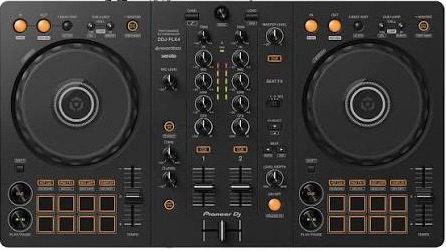
I decided a few weeks back after watching some DJ videos that perhaps the songs I was uploading weren’t as DJ friendly as I thought they were. I recently invested in a Pioneer DDJ FLX4 as new they are only £280 and they match the layout of many club rigs. It also came with Rekordbox free license so I reckoned I could use that as a way to practice being a DJ with my own songs and see what amendments I needed to make to make them DJ Friendly.
After a few days of watching some really good YouTube content (I will link some below that I liked) I decided to start preparing some music that I had in iTunes and some of my own tracks to create a dummy set. It’s at times like this that you realise that what looks like a simple process is actually way more complicated and time consuming. There is a reason top DJs make it look effortless. They have spent years honing their material and skills to make it look that seamless. If nothing else my purchase had given me a new respect for the art of DJ ing.
The first steps involve organising my collection and my deck to suit how I will work with them. This was a hard lesson learned from Ableton. Setting up folders correctly early on saves so much time later on.
An initial load of my iTunes folders into a Rekordbox collection quickly highlighted where I would need to spend some effort.
1. Albums that are premixed won’t always sit correctly on the beat.
If you think you can just drop a greatest hits album in and all the tracks will work as expected then you are as naive as I was. Luckily one of the tutorials I found showed how you could adjust what Rekordbox would use as its beat 1 on each track, so that involved going through each track and looking at that first beat (zoomed in). Is it right or half a bar out and requiring fixed. You can manually adjust on the fly with the jog wheels but why give yourself that extra headache if you can fix it up front.
Obviously if you buy individual tracks from somewhere like Beatport then they will be better for Rekordbox to recognise where the beat one sits as it won’t have another track mixed in at the start and end to confuse it.
I had to go through about 50 songs but if you do it as you add tracks after that it should just be the first set up that is time consuming.
2. You need to set hot cues (or memory cues) in key places in the track.
The FLX4 has 8 hot cues buttons, which when set up allows you to quickly jump to another section of the track, that you have previously set up. I went through the initial tracks and added a hot cue for the start of breakdowns, buildups and drops. I wasted some time here so worth reading on to see where I learned my lesson.
Later on in the tutorials I discovered that a club rig won’t have hot cue buttons like the FLX4 but they will accept memory cues. That’s probably worth thinking about how you will be working. If like me it’s just a tool in my studio then hit cues are fine. If it’s a practice rig on the way to a full one then perhaps memory cues would be a better route. Whichever you choose it’s best to follow a system that works for you. Maybe keep it to 4 and always the same location from track to track so you know #3 will always be the build up for example. Helps you to develop muscle memory.
I also discover half way through this process about hot loops, and that is worthwhile investigating, as it can save your whole set from ending up as blank mess.
I decided to add a hot loop on button 1 near the start of a track. This gives me a looped section to beat match ready for the next track coming in. I also make button 8 a hot loop near the end of the track. This means that if I am interrupted or have to leave the set for any reason that this song won’t run out and no one would notice. It gives you that safety net on all your tracks to know that you won’t ever run out of space to mix in your next track. They are also handy to loop specific sections of say a breakdown where you want to add some additional material like an acapella or samples.
3. I am too clumsy to have the top of the jog wheel and the Crossfader turned on.
I was finding that I leaned over the deck to perhaps do a manual loop that I was sometimes touching the top of the jog wheel and stopping the song dead in its tracks. I set up the keys [ and ] in the keyboard shortcuts to turn off this function on deck 1 and deck 2 respectively. I can quickly turn them on if I need them to mix .
I also found out how to turn off the crossfader in the mixer section of Rekordbox. You can’t do it on the FLX4 itself. Look for the crossfader in the mixer section and deselect the deck1 and deck1 buttons below it. From now on I will swap volumes with the two volume sliders and avoid accidentally nudging the crossfader to a silent track or one that isn’t beat matched yet.
I will add more sections to this as I go through the process so subscribe to the newsletter if you want to see those.
Links to get you started
DJ Blakey – really clear and precise instructions on using FLX4 for beginners.
DJ Carlo – another great source of instruction.
Club ready DJ School – if you are looking for some positive vibes with your instructor then this is your guy.

Leave a comment